
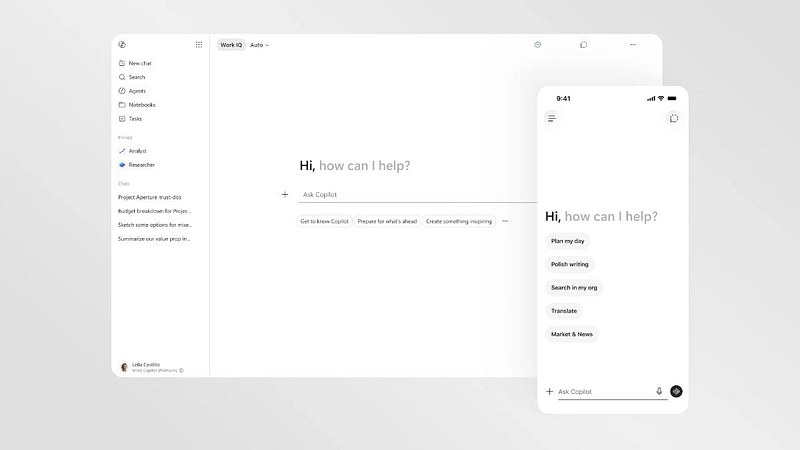
If your team uses Microsoft 365, Copilot is about to look and behave quite differently. Microsoft announced a full redesign of the Copilot app in late May, alongside a long list of new features rolling out across Teams, Word, PowerPoint and Outlook through June.
Most of these updates arrive automatically, so you don’t need to install anything. But a few of them change how your staff will work day to day, and a couple have security implications worth understanding before they land.
Here’s a plain English rundown of what’s changing and which updates deserve your attention.
A cleaner, faster Copilot app
The most visible change is the redesigned Microsoft 365 Copilot app, which is rolling out during June. Microsoft says the app now loads more than twice as fast, and the layout has been simplified so chat sits front and centre with tools appearing only when you need them.
The redesign also reworks Copilot Notebooks, which let you group chats, files and references by project. Notebooks now sync with OneNote, can pull in transcripts and notes from specific Teams meetings, and can even generate an Excel spreadsheet from the material you’ve collected. For anyone juggling several clients or projects at once, that’s a tidy way to keep AI work organised rather than scattered across dozens of one-off chats.
More choice in the AI models behind Copilot
Copilot is no longer powered by a single AI model. Microsoft added Anthropic’s Claude Opus 4.8 in May, alongside OpenAI’s GPT-5.5 Instant, and licensed users can switch between them in Copilot Chat, Excel and PowerPoint.
You don’t need to understand the differences in depth. The short version: Claude models tend to handle longer, multi-step tasks well, while GPT-5.5 Instant is tuned for quick everyday answers. The practical benefit is that if one model gives a disappointing result, your team can try the same request with another.
Practical upgrades in Teams, Word and PowerPoint
A few of the app-level updates stand out for small and medium businesses.
In Teams, Copilot can now answer a phone call you can’t pick up, capture what the caller needed and send you a summary to follow up on. Video recap turns recorded meetings into short narrated highlight reels, which is far quicker than scrubbing through an hour-long recording. Meeting organisers can also now permanently delete recordings, transcripts and AI summaries from the recap page, with no admin setup required.
Word users get a catch-up summary of recent edits and comments in the Copilot pane, and Copilot now remembers your preferences between sessions so you’re not restating the same instructions every time.
PowerPoint picked up three one-click skills in May: one reviews your deck and suggests improvements slide by slide, one turns text-heavy slides into visuals, and one helps you anticipate the questions your audience might ask.
The security side of the update
Two items in this release matter from a governance point of view. Teams meetings can now overlay a watermark of each attendee’s email address across shared content, which discourages screenshots of sensitive material. And Microsoft has extended its ISO/IEC 42001 certification, the international standard for AI management systems, across more of the Copilot range.
Both are welcome. But they’re also a reminder that Copilot reads whatever your staff can access, including files and mailboxes with permissions that may be looser than you think. Before rolling Copilot out widely, it’s worth reviewing how your Microsoft 365 environment is secured and configured.
What this means for your business
If you already have Copilot licences, expect the new app design to appear during June. It’s worth giving your team a heads-up so the change doesn’t generate confused helpdesk calls. The Notebooks and PowerPoint features are good candidates for a short internal demo, since they’re the ones most likely to save real time.
If you’ve been weighing up whether Copilot is worth the spend, this release strengthens the case, but the answer still depends on how your business works. Copilot delivers the most value when your files and permissions are in reasonable shape first. AI layered over a messy Microsoft 365 tenancy mostly produces faster access to the mess.
And whatever you decide, the deletion and watermark controls are worth switching on once they reach your tenancy. They cost nothing and close off some easy avenues for sensitive information to leak.
Frequently asked questions
Do these updates cost extra?
No. They’re included with existing Microsoft 365 Copilot licences, which are an add-on to standard Microsoft 365 business plans. Features arrive automatically as Microsoft rolls them out.
When will my business see the changes?
Most features rolled out in May or are arriving through June 2026. Exact timing varies by tenancy, so different staff may see changes at different times.
Is Copilot safe to use with our company data?
Copilot respects your existing Microsoft 365 permissions and doesn’t use your business data to train the underlying models. The risk usually sits in overly broad internal permissions, which is fixable with a proper review.
Thinking about Copilot, or want to make sure your Microsoft 365 setup is ready for it? Project IT helps New Zealand businesses get their 365 environment secure and well configured before adding AI on top. Book an IT Review and we’ll take a look together.