
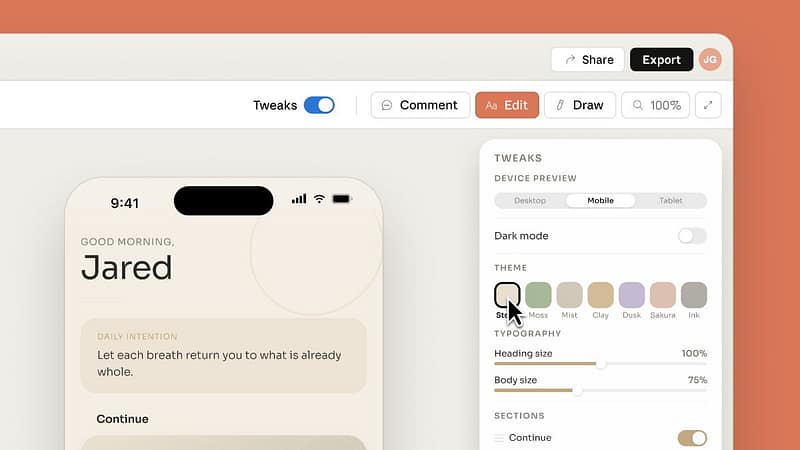
Anthropic launched Claude Design in April, and it’s one of the more useful AI releases this year for people who aren’t designers. Describe what you want, a landing page, a pitch deck, an app mockup, and Claude Design builds a first version on a visual canvas in front of you. From there you refine it by chatting, commenting on specific elements, or editing text directly.
It’s aimed squarely at founders, product managers and marketers who have an idea but no design background. If that’s you, here’s how to get a good result from day one, plus two ways to stop it chewing through your usage allowance.
What is Claude Design?
Claude Design lives at claude.ai/design and comes with Claude Pro, Max, Team and Enterprise plans. It’s a research preview from Anthropic Labs, so it’s still evolving, but the core workflow is solid: chat panel on the left, live design canvas on the right.
When you’re happy with a design, you can export it as a PDF, PPTX or standalone web page, send it to Canva for further editing, or hand it to Claude Code to be built into a real product. We covered getting more from Claude generally in our earlier post on Claude AI for business; this one is about the design tool specifically.
Tip one: set up your design system before anything else
Anthropic’s own guidance is blunt about this. Without brand context, the output is “functional but generic”. With it, every new project automatically uses your colours, fonts and components.
Setup is a one-off. Upload your logo, brand colours, a slide deck that looks the way you like, or point it at your website, and Claude builds a design system from what it finds. Review it, publish it, and every project after that starts on-brand. Teams can keep more than one system if they run separate brands.
Tip two: brief it like you’d brief a person
One-line prompts get vague results. A good brief covers four things: the goal, the rough layout, the actual content, and who it’s for. “Create a one-pager for tradie clients explaining our monthly IT support, with pricing at the bottom” will beat “make a flyer” every time.
Claude Design also asks clarifying questions when your prompt leaves gaps. Answer them properly rather than brushing past, because those answers shape everything it draws next.
Tip three: work in versions
Before you try a different direction, tell Claude to save what you have first. Something like “save this version, then try a bolder layout” means you can always come back, and you won’t spend prompts rebuilding something you already had.
Sharing works the same way. Designs can be shared across your organisation with view, comment or edit access, and edit access lets a colleague chat with Claude inside the same design rather than starting their own from scratch.
Two ways to save tokens
Claude Design usage is metered separately from normal Claude chat, with allowances that reset weekly per user. Two habits make that allowance go a lot further.
First, use the built-in controls for small changes instead of asking Claude to redraw. Text on the canvas can be edited directly, and the adjustment sliders handle spacing, colour and layout tweaks live. Claude only spends tokens generating when you ask for changes in chat, so save the chat for changes that actually need it.
Second, if you point it at a codebase so it can learn your product’s look, link the relevant folder rather than the whole repository. It reads less, which costs less and responds faster. Anthropic lists large-codebase lag as a known issue, and the fix is the same either way.
What this means for your business
For a typical NZ business, this is the fastest route yet from “I need something visual” to something you can actually show a client: proposals, one-pagers, landing page drafts, pitch decks. First drafts that used to mean a designer’s invoice or a lost weekend now take a conversation.
Two cautions. It’s a preview product, so expect rough edges. And the admin side is still thin: there are no audit logs or usage reports for administrators yet, and uploaded assets are stored persistently, so keep sensitive client material out of it for now. On Enterprise plans it’s off by default until an admin enables it, which is the right call.
If you’re weighing up where tools like this fit alongside Microsoft 365 and the rest of your stack, that’s exactly the kind of question our IT consulting service exists for.
Common questions
How much does Claude Design cost?
It’s included with Claude Pro, Max, Team and Enterprise subscriptions and uses your plan’s limits, metered separately from chat. There’s no access on the free plan.
Does it replace Canva or Figma?
No, and Anthropic says it isn’t meant to. It’s built for getting from idea to first draft quickly. You can send finished designs to Canva, where they become fully editable, but there’s currently no native Figma import or export.
Is it safe to use with business data?
Treat it as a preview. Until audit logs and admin reporting arrive, use it for marketing and internal material rather than anything containing client or personal information.
Want a second opinion on which AI tools are worth rolling out to your team, and how to do it safely? Book an IT Review and we’ll walk through it together.